

Homebase provides a powerful suite of tools designed to help small businesses manage their workforce efficiently. The software is specifically tailored for businesses that need to manage hourly workers, providing features for employee scheduling, time tracking, team communication, payroll integration, and labor law compliance. By automating routine tasks, Homebase enables business owners and managers to save time and focus on more critical aspects of running their business.
One of Homebase's core features is its employee scheduling system, which simplifies the process of creating and managing work schedules. Managers can easily assign shifts, accommodate employee availability, and make quick adjustments to schedules, all through a user-friendly interface. The platform’s mobile app makes it easy for employees to view their schedules, swap shifts, or request time off, reducing the chances of scheduling conflicts and improving overall communication.
Time tracking is another essential feature of Homebase. Employees can clock in and out via the app, ensuring accurate records of hours worked. This data syncs automatically with payroll systems, making payroll processing more streamlined and helping businesses comply with labor laws. Homebase also offers tools for tracking overtime, breaks, and paid time off (PTO), giving managers greater visibility over employee hours.
Homebase includes a built-in messaging system that allows team members to communicate in real-time, making it easier for staff to stay connected and updated on important changes. The platform’s integration capabilities with tools like QuickBooks, Gusto, and Square allow businesses to handle payroll, accounting, and point-of-sale systems without switching between multiple platforms.
For businesses looking to expand, Homebase also offers hiring and onboarding tools to manage job postings, applications, and new hire paperwork. With these tools, businesses can streamline their recruitment and onboarding processes, reducing the time spent on administrative tasks.
Key Features & Specifications
-
Employee Scheduling: Easily create and manage schedules, handle shift swaps, availability, and notifications to avoid scheduling conflicts.
-
Time Tracking: Accurate tracking of employee hours, with real-time clock-in/clock-out features and automatic syncing with payroll.
-
Payroll Integration: Seamlessly integrates with payroll platforms like Gusto, QuickBooks, and ADP to simplify payroll processing.
-
Team Communication: Built-in messaging and communication tools to ensure smooth interaction and coordination among team members.
-
Labor Law Compliance: Features for tracking overtime, breaks, and work hours to ensure compliance with local labor laws.
-
Hiring & Onboarding: Tools for posting job openings, reviewing applications, and onboarding new employees efficiently.
-
Mobile Access: Both managers and employees can access schedules, track hours, and communicate via the Homebase mobile app.
-
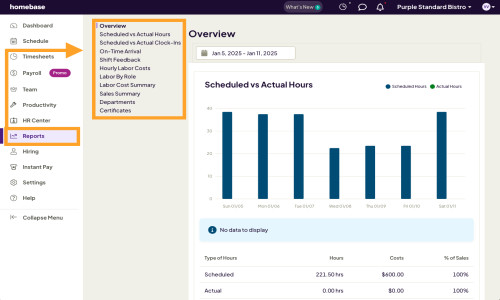
Reporting & Analytics: Generate reports on labor costs, scheduling efficiency, and employee performance to make data-driven decisions.
Specifications:
-
Platforms: Available as a web application, iOS, and Android mobile apps.
-
Integrations: Compatible with popular tools like Gusto, QuickBooks, ADP, Square, and others.
-
Pricing: Offers a free plan with basic features, with paid plans starting at $14.95 per month per location.
- ✓ Employee Timeclock
- ✓ Shift Swapping
- ✓ Staff Notification
- ✓ Workforce Forecasting
- ✓ Employee Portal
- ✓ Real-time Reporting
- ✓ Drag and drop Builder
- ✓ Automated Scheduling
- ✓ Compliance Tracking
- ✓ Reminders
- ✓ Predefined Templates
- Basic scheduling
- Basic time tracking
- Point-of-sale integration
- Payroll add-on available
- Advanced scheduling
- Advanced time tracking
- Team communication
- Payroll add-on available
- Hiring
- PTO & time-off controls
- Departments & permissions
- Payroll add-on available
- Employee onboarding
- Labor cost management
- HR & compliance
- Payroll add-on available
What do you like best? The only thing I like about homebase is the message board. What do you dislike? I hate the way the it shows everyone’s schedule. I don’t like the way you have to request time off. Should just be able to select shi...
PROS & CONS What are the best aspects of this product? I have no idea. There are constant 505 error messages. NOTHING WORKS!! What aspects are problematic or could work better? The software simply does not work. i got nothing but error mes...
PROS & CONS What are the best aspects of this product? I have no idea. There are constant 505 error messages. NOTHING WORKS!! What aspects are problematic or could work better? The software simply does not work. i got nothing but error mes...
What do you like best? Users can track their hours and earnings by pay period. What do you dislike? Homebase no longer allows users to sign into an "unscheduled shift." When the feature did exist, my employers allowed me to come into work and les...
What do you like best? Homebase does the job it needs to by showing who is working when and during what shifts. You can request to trade shifts with another employee (which then requires admin approval). You can also ask for people to cover your sh...
Homebase offers 4 pricing plan(s):
- Basic — USD0.00 / location / month for 1 location, up to 10 employees
- Essentials — USD27.00 / location / month unlimited employees
- Plus — USD63.00 / location / month unlimited employees
- All-in-one — USD108.00 / location / month unlimited employees
Homebase is a Employee Scheduling Software solution. Top features include:
- Employee Timeclock
- Shift Swapping
- Staff Notification
- Workforce Forecasting
- Employee Portal
Yes, Homebase offers a 0-day free trial.
Homebase provides Phone,Online (Ticket),Business Hours support.
Homebase is Cloud Hosted software.
Homebase provides Help Guides,Video Guides,Blogs for training.


