
Web Help Desk

Help Desk System BY SolarWinds Worldwide LLC
What is a Web Help Desk
Web Help Desk is an IT service management tool that offers a centralized platform for tracking, managing, and resolving help desk tickets. It is ideal for IT departments looking to automate repetitive tasks, enforce SLA policies, and generate insightful reports. Web Help Desk can be easily integrated with other IT tools, allowing seamless operations across different systems. Web Help Desk is a powerful Help Desk Software solution designed to streamline IT support operations.
Why Choose Web Help Desk
Organizations choose Web Help Desk because of its ease of use, scalability, and comprehensive features. It offers an all-in-one platform that eliminates the need for multiple service tools, saving time and money. Web Help Desk pricing is competitive, making it accessible to businesses of all sizes. Additionally, Web Help Desk reviews consistently highlight its reliability, strong performance, and the excellent support provided by the vendor.
Benefits of Web Help Desk
Improves ticket resolution times through automation and prioritization
Enhances team collaboration with centralized communication
Provides detailed analytics and reporting for better decision-making
Reduces manual work with workflow automation and templates
Streamlines IT asset management and inventory tracking
Boosts customer satisfaction with quicker response times
Offers easy deployment and integration with existing systems
Web Help Desk pricing plans cater to different budget needs
Web Help Desk reviews show high customer satisfaction rates
Web Help Desk demo is available for a hands-on experience
How to Use Web Help Desk
Using Web Help Desk starts with a simple setup process that includes defining user roles, ticket categories, and service level agreements. After setup, support agents can receive and manage tickets through the intuitive dashboard. The software automates ticket assignments based on predefined rules, ensuring efficient routing. Users can track ticket status, attach files, and communicate with support staff. Managers can generate reports and monitor KPIs to ensure performance goals are met. The Web Help Desk demo provides a clear overview of its operational flow.
Features of Web Help Desk
Ticket Management: Create, assign, and resolve tickets efficiently
Automation Rules: Auto-route and prioritize tickets based on criteria
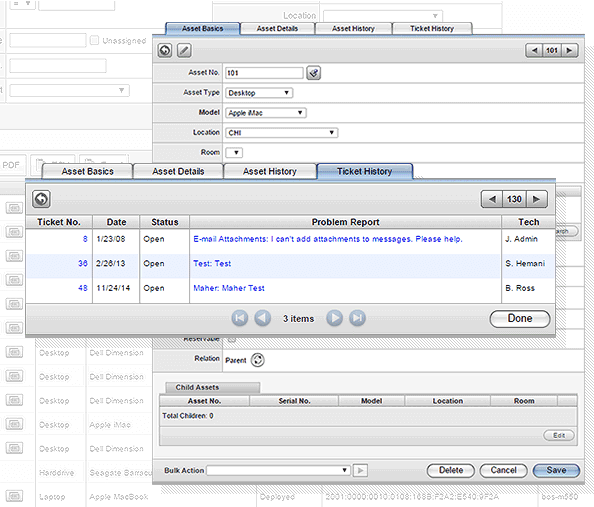
Asset Management: Track hardware and software inventory
SLA Management: Define and enforce service-level agreements
Knowledge Base: Create articles to reduce repeated queries
Reporting Tools: Generate custom reports and analytics
Email Integration: Convert emails into support tickets automatically
User Management: Define roles and permissions for team members
Customer Portal: Allow users to submit and monitor tickets online
Calendar & Scheduling: Manage technician appointments and deadlines
Web Help Desk features are designed for efficiency and scalability
Web Help Desk pricing reflects value across multiple business sizes
Web Help Desk demo showcases all core functionalities in action
- Manage on-prem
- hybrid
- cloud-native ecosystem with end-to-end full-stack visibility
- powered by AI
- Monitor database for new issues
- diagnose and uncover root causes
- optimize for faster performance for major leading database technologies
- Resolve issues faster
- structure and centralize information
- provide high quality services
- connect the organization with an AI-powered solution
No reviews yet. Be the first to review!
Web Help Desk offers 3 pricing plan(s):
- Monitoring & Observability — USD6.00 Per node / month
- Database — USD117.00 Per database / month
- Service Management — USD39.00 Per technician / month
Yes, Web Help Desk offers a 14-day free trial.
Web Help Desk provides Phone,Email,Live Chat,Online (Ticket) support.
Web Help Desk provides Video Guides,Webinars,Infographics,Case Studies for training.


