
Map My Relationships enables users to visualize mind map of crucial information in Microsoft Dynamics 365 CRM with the help of two custom controls i.e., Relationships control and Connections control. Visualize relationships between various Entities/related records and view the connection records. Navigate easily to related records and quickly record various activities like phone calls, emails, or appointments. Take advantage of the information available at a glance for swift action and timely completion of different tasks.
Features
- Entity Support: Map My Relationships supports both OOB and Custom Entities
- Relationships: Support for 1:N, N:1 as well as N:N information
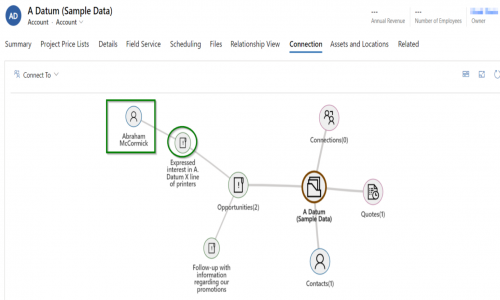
- Connections: Configure connection control to create, update, view, and delete connection records with ease. View the connections in the user’s preferred format - grid/card/relationship view.
- Easy Navigation: An easier and quicker way for users to search and navigate to a record through the relationship view of Connections.
- 360 degrees view: Single view summary of all important data of the record
- Quick Actions: Quickly record any activity like a phone call or appointment for the related records
- Configuration: Configure controls for a Unified, Mobile and Tablet experience
- Grouping & Aggregation: View aggregate values without the need for creating rollup fields
- Drill-down: Set up child configuration for N-level relationships for further drill-down
- Create Associate Record: One-Click creation of a new entity record through the entity node in the relationship view
- Connect Records: Drill down to N-level and create a connection from within the connection relationship view
- Color Legends: Indicate the connection roles for connected records
Contact us to get detailed pricing as per your requirements.
No reviews yet. Be the first to review!
Yes, Map My Relationships offers a 15-day free trial.
Map My Relationships provides Email support.
Map My Relationships is Cloud Hosted software.
Map My Relationships provides Help Guides,Blogs,Webinars,Infographics,Case Studies,Whitepapers for training.


