

LastPass is an antivirus software program designed to save your computing structures from malicious software. It gives safety towards several styles of malware, viruses, adware, phishing, and so forth. It also offers a password supervisor and a vault to stable on-line accounts, making it one of the high-quality antivirus software.
- ✓ Password Reset
- ✓ Password Generator
- ✓ Secure Password Sharing
- ✓ Multifactor Authentication
- ✓ Single Sign-On (SSO)
- ✓ Offline Functionality
- ✓ Backup/Restore
- ✓ Third-party Integration
- ✓ Password Encryption
- ✓ Saved Cards
- ✓ Mobiles Password Management
- ✓ Websites Password Management
- User limit - 1
- Number of passwords - Unlimited
- Device type - Limited to 1
- Automatic device sync
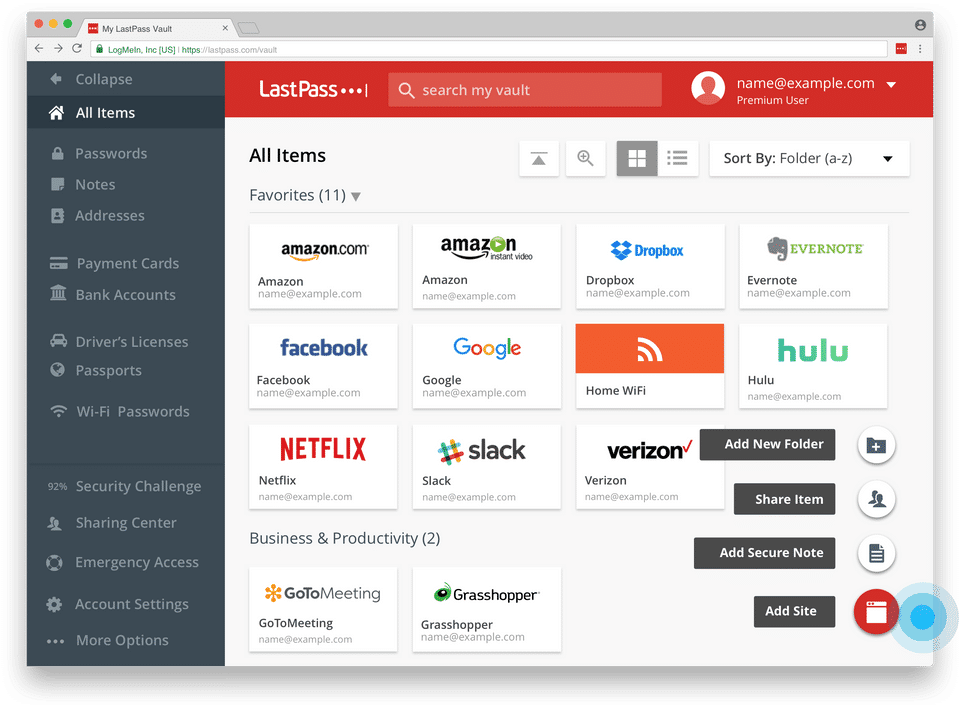
- Secure password vault
- Save and autofill passwords
- Password generator
- One-to-one sharing
- Secure notes
- Multifactor authentication
- LastPass Authenticator
- Self-service resources
- User limit - 1
- Number of passwords - Unlimited
- Device type - Limited to 1
- Automatic device sync
- Secure password vault
- Save and autofill passwords
- Password generator
- One-to-one sharing
- Secure notes
- Multifactor authentication
- LastPa
- User limit - 1
- Number of passwords - Unlimited
- Device type - Unlimited
- Automatic device sync
- Secure password vault
- Save and autofill passwords
- Password generator
- One-to-one sharing
- One-to-many sharing
- 1 GB file storage
- Security dashboard and score
- Dark web monitoring
- Emergency Access
- Secure notes
- Multifactor authentication
- LastPass Authenticator
- Advanced MFA options
- Self-service resources
- Personal support
- User limit - 1
- Number of passwords - Unlimited
- Device type - Unlimited
- Automatic device syn
- User limit - 6
- Number of passwords - Unlimited
- Device type - Unlimited
- Automatic device sync
- Secure password vault
- Save and autofill passwords
- Password generator
- One-to-one sharing
- One-to-many sharing
- Unlimited shared folders
- Family manager dashboard
- 1 GB file storage
- Security dashboard and score
- Dark web monitoring
- Emergency Access
- Secure notes
- Multifactor authentication
- LastPass Authenticator
- Advanced MFA options
- Self-service resources
- Personal support
- User limit - 6
- Number of passwords - Unli
- Number of users - 50 users or fewer
- Admin console
- Vault for every employee
- Password generator
- Save & autofill passwords
- Shared folders
- Customizable security policies - Choose from 10 policies
- Offline mode
- Security dashboard
- Dark web monitoring
- Standard Two-Factor Authentication (2FA)
- MFA for the password vault
- Self-guided support
- Number of users - 50 users or fewer
- Admin console
- Vault for every employee
- Password generator
- Save & autofill passwords
- Shared folders
- Customizable security policies -
- Number of users -Unlimited
- Add-ons - Advanced SSO
- Advanced MFA
- Advanced SSO & MFA bundle
- Admin console
- Vault for every employee
- Password generator
- Save & autofill passwords
- Groups
- Shared folders
- Customizable security policies - Access to 100+ policies
- Offline mode
- Security dashboard
- Dark web monitoring
- Advanced reporting
- Admin controls
- Adoption Dashboard
- Customizable User Management
- Federated login
- API access
- Directory integrations
- Standard Two-Factor Authentication (2FA)
- Contextual authentica
What do you like best? Possibility to generate secure passwords and possibility to store these safely. What do you dislike? Buggy product, have had issues with with seeing passwords, settings (automatically logout, login in, and retrieving my pa...
What do you like best? its a great concept! its meant to help a lot of people, but there are way too many sharing options that make it hard to onboard clients with it. What do you dislike? i dont like how hard it is to share passwords wi...
What do you like best? Better than nothing. SecOps approved though the features that led to it do not work (bugs). Creates secure passwords. What do you dislike? Too many to list. Buggy app despite being version 4.3.0. Terrible user exp...
What do you like best? Excellent product if you have under 500 passwords that your company needs to securely share and restrict access based on department and role. What do you dislike? Unfortunately, at ~5,000 passwords using ~100 f...
What do you like best? Does its job by enabling quick logins. What do you dislike? Bad if you use multiple accounts for each site (ex., multiple accounts. It's easier to just type in your password than mess with this tool. Recommendations to ...
LastPass offers 5 pricing plan(s):
- Free (Single Users and Families) — USD0.00
- Premium (Single Users and Families) — USD3.00 /Month
- Families (Single Users and Families) — USD4.00 /Month
- Teams (Business Plans) — USD4.00 /User/Month
- Business (Business Plans) — USD6.00 /User/Month
LastPass is a Password Management Software solution. Top features include:
- Password Reset
- Password Generator
- Secure Password Sharing
- Multifactor Authentication
- Single Sign-On (SSO)
Yes, LastPass offers a 0-day free trial.
LastPass provides Online (Ticket),Business Hours support.
LastPass is Cloud Hosted software.
LastPass provides Help Guides,Video Guides,Blogs for training.


