
JS Paint

Classic Paint, Modern Twist
What is JS Paint?
-
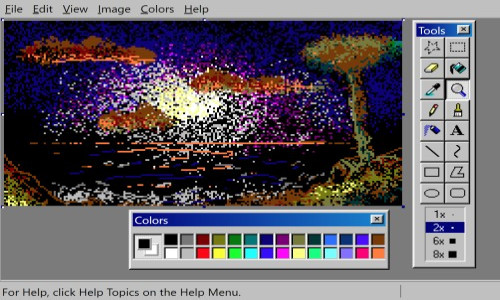
JS Paint is a browser-based version of the classic Microsoft Paint.
-
Brings back the familiar look from the Windows XP days.
-
It’s open-source and runs right in your web browser.
-
No downloads or setup needed—just open and go.
-
Offers core tools like pencil, brush, shapes, and text.
-
Great for sketching, simple edits, or just doodling.
-
Features autosave and works across different devices.
-
Clean, easy-to-use interface for everyone.
Why Choose JS Paint?
-
Feels just like the old-school MS Paint you grew up with.
-
Works on any device—Windows, Mac, tablet, or phone.
-
No installation or account required.
-
Super simple tools—great for beginners and casual use.
-
Fast, distraction-free environment for basic image work.
-
Includes modern upgrades like autosave and dark mode.
-
Great for anyone who wants a quick, no-fuss drawing tool.
-
Lightweight and reliable for daily use.
Benefits of JS Paint
-
Easily accessible from any modern web browser.
-
Familiar layout makes it comfortable to use right away.
-
Works well on desktops, laptops, and tablets.
-
Automatically saves your work as you go.
-
Doesn’t slow down your device—very lightweight.
-
Ideal for quick drawings or basic edits.
-
No need to create an account or log in.
-
Fast performance without lag or delay.
How to Use JS Paint
-
Go to the website—it loads in seconds.
-
Pick a tool: pencil, brush, shapes, text—you name it.
-
Choose a color and start creating on the canvas.
-
Use the menu to save, print, or open a file.
-
Zoom in/out or resize your canvas if needed.
-
Undo/redo changes quickly with shortcuts.
-
No sign-up required—just click and draw.
-
Works great with a mouse, touchscreen, or stylus.
Features of JS Paint
-
Classic Microsoft Paint interface with a modern twist.
-
Includes drawing tools: pencil, brush, shapes, lines, and text.
-
Fill tool and color picker available.
-
Resize canvas, rotate images, and zoom with ease.
-
Toggle between light and dark mode.
-
Autosave and version history included.
-
Keyboard shortcuts make editing even faster.
-
Runs smoothly on all popular browsers and devices.
What Makes JS Paint Different?
-
Feels nostalgic but packed with helpful updates.
-
No software downloads, installs, or updates needed.
-
Completely open-source and community-driven.
-
Offers features missing in the original Paint.
-
Supports undo/redo history and autosave.
-
Works across platforms—any browser, any device.
-
Incredibly fast and lightweight—loads instantly.
-
Perfect for personal, educational, or creative use.
Who Can Benefit from JS Paint?
-
Students: Create quick diagrams or visual projects.
-
Teachers: Use it for simple in-class drawing or notes.
-
Designers: Sketch rough concepts or wireframes.
-
Nostalgic users: Relive the MS Paint experience.
-
Content creators: Make memes or quick social media edits.
-
Beginners: Learn digital drawing basics with ease.
-
Everyone: Anyone who wants a simple, fun drawing app.
-
Professionals: Handy for small image tweaks on the go.
Is JS Paint Easy to Use?
-
Super beginner-friendly with a familiar layout.
-
No experience or training needed to get started.
-
Clearly labeled tools for easy navigation.
-
Just open it in your browser—no installs or logins.
-
Touchscreen and stylus users get smooth performance too.
-
Menu and shortcuts help speed up your workflow.
-
Autosave and version control protect your work.
-
A stress-free drawing experience for all ages.
What Support Does JS Paint Offer?
-
Supported by a community of developers and users.
-
Anyone can suggest features or report bugs.
-
Ongoing development keeps the app fresh and stable.
-
Rarely crashes or lags, thanks to its simplicity.
-
Icons and tooltips help guide you through features.
-
No formal help desk, but issues are easy to solve.
-
Reliable for everyday drawing and editing needs.
-
Updates happen automatically in the background.
Contact us to get detailed pricing as per your requirements.
No reviews yet. Be the first to review!
Yes, JS Paint offers a 7-day free trial.
JS Paint is On Premise,Any software.


