

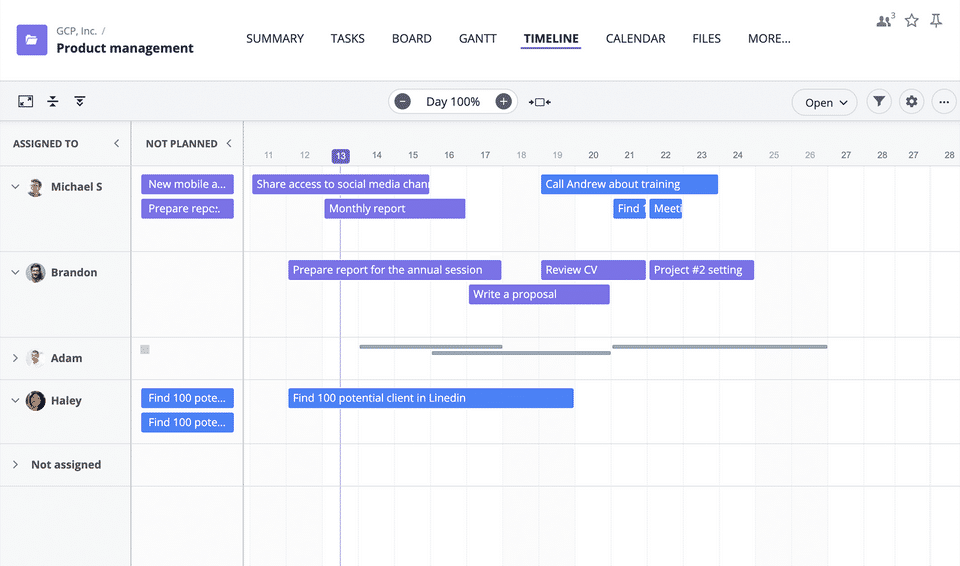
- ✓ Timeline View
- ✓ Project Templates
- ✓ Idea Management
- ✓ Kanban Board
- ✓ Recurring Task Management
- ✓ Time & Expense Tracking
- ✓ Task Management
- ✓ Status Tracking
- ✓ Resource Management
- ✓ Requirement Management
- ✓ Project Planning
- ✓ Portfolio Management
- ✓ Percent-Complete Tracking
- ✓ Milestone Tracking
- ✓ IT Project Management
- ✓ Issue Management
- ✓ Budget Management
- ✓ Reporting (Analytics)
- ✓ Time Tracking
- ✓ Task Tracking
- ✓ Task Scheduling
- ✓ Task Assigning
- ✓ Progress Tracking
- ✓ Gantt Charts
- ✓ Alerts
- ✓ Collaboration Tools
- ✓ Gamification
- 1-15 users
- Unlimited projects / tasks / events
- 1 GB of storage
- Up to 15 members
- Calendar and events management
- Custom workflows
- task and project types
- Time tracking
- Analytics
- Basic integrations (G-Suite
- Google calendar
- G-Mail
- Google Drive
- Email)
- Activity stream
- Dashboards
- Views
- Basic support
- Customer success webinars
- 1-15 users
- Unlimited projects / tasks / events
- 1 GB of storage
- Up to 15 members
- Calendar and events management
- Custom workflows
- task and project types
- Time tracking
- Analytics
- 5-250 users
- All Free edition features
- Unlimited storage
- Up to 250 members
- Advanced integrations (Slack
- Dropbox
- Box)
- Advanced search
- User roles customizations
- Advanced views
- Big Screens
- Advanced time tracking
- Reports and Advanced Analytics
- Custom fields
- Advanced views (Gantt
- Workload
- Timeline)
- Advanced task management (recurrency / duplicate / task templates)
- 24/7 support
- One-to-one training
- Dedicated customer success manager
- 5-250 users
- All Free edition features
- Unlimited storage
- Up to 250 m
- 25-unlimited users
- Includes features of Professional plan
- plus
- Unlimited storage
- Unlimited members
- Enterprise API
- Advanced security features
- SAML 2.0 Single Sign-On
- Custom branding
- Enrerprise access control
- Private cloud option
- Custom Reporting
- 24/7 support
- One-to-one training
- Dedicated customer success manager
- 25-unlimited users
- Includes features of Professional plan
- plus
- Unlimited storage
- Unlimited members
- Enterprise API
- Advanced security features
- SAML 2.0 Single Sign-On
- Custom branding
- Enre
What do you like best? Goodday is easy to get the hang of quickly, little to no onboarding required. Tracking the history of a task is super easy, and helpful when tasks need to be handed off or include another person. Task planning is super easy a...
What do you like best? Dashboard & project reports make it easy to see how a project is coming along. My work page is intuitive and planning my to do list is a breeze. What do you dislike? Some time need at begging to set up a project. ...
What do you like best? It is free to use for 5 users and you can set reminders for the upcoming tasks What do you dislike? Initial load time is very high, Adding new users to any of the existing tasks takes multiple click where it should...
What do you like best? Goodday is a pretty straightforward tool once you get the hang of it. It focuses heavily around task and project organization, which is helpful when working with a large team with a variety of tasks. Our team has responded to...
What do you like best? Clean user interface and practical approach to project management and tasks What do you dislike? No real mobile product really gets in the way of distributing work over time (train, home, etc.,..) What pro...
GoodDay offers 3 pricing plan(s):
- Free — USD0.00
- Professional — USD6.00 /User/Month
- Enterprise — USD0.00
GoodDay is a Project Management Software With Slack Integration solution. Top features include:
- Timeline View
- Project Templates
- Idea Management
- Kanban Board
- Recurring Task Management
Yes, GoodDay offers a 0-day free trial.
GoodDay provides Phone,Business Hours,Online (Ticket) support.
GoodDay is Cloud Hosted software.
GoodDay provides Help Guides,Blogs,Video Guides for training.


