
Stages & leads
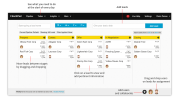
In the sales pipeline view, leads are represented by cards and stages by columns. This view, inspired by Kanban boards, allows you to track the entire sales cycle and see where all leads are in the sales pipeline at a glance.+
Filters & Pipelines
Create multiple sales pipelines so that you can track different aspects of your sales process. Filter leads in a sales pipeline by users, products, sources, zones, contacts or any combination of the above.
Quick actions
A number of actions such as adding and renaming leads, assigning a user to a lead or moving the lead to another stage in the sales pipeline can be accomplished from the sales pipeline view itself.
- Stages & leads
- Filters & Pipelines
- Quick actions
- Todo Lists
- Notes
- Custom Fields
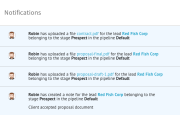
- Notifications
- Daily Activity Snapshot
- Add to Mail Lists
- Bulk Import Contacts
No reviews yet. Be the first to review!
ClinchPad CRM offers 1 pricing plan(s):
- Basic Plan — INR500.00
Yes, ClinchPad CRM offers a 14-day free trial.
ClinchPad CRM provides Live Chat,Online (Ticket) support.
ClinchPad CRM is Cloud Hosted software.
ClinchPad CRM provides Video Guides,Blogs,Webinars,Infographics,Case Studies for training.


